Research on adult ADHD executive functioning identifies planning, organization, working memory, and inhibition as core ADHD deficits — not secondary symptoms. When an app assumes you can start tasks on demand, remember to check it, and sustain consistent energy throughout the day, it's asking you to use the exact systems your brain struggles with most.
The apps in this guide were chosen differently. Each one maps to a specific executive function barrier. None of them are magic. But matched to the right challenge, the right tool can make a real difference.
Key Takeaways
- Apps help most when matched to a specific barrier: task capture, time blindness, focus, initiation, or habit formation
- No single app solves everything — two or three well-chosen tools outperform an overcrowded stack
- Every app on this list was chosen because it lowers the barrier to starting, not raises it
- App abandonment is common and expected with ADHD — it's a design problem, not a personal one
- If you're unsure where to start, identifying your biggest executive function challenge — initiation, focus, or time blindness — narrows the list fast
Why Standard Productivity Apps Often Fail ADHD Brains
Standard task managers make three assumptions that collapse immediately for ADHD users:
- You can start tasks when you decide to
- Your energy and focus are consistent throughout the day
- You'll remember to check the app
All three are executive function demands — and a 2020 study of adults with ADHD found that reduced organizational skill in ADHD stems from deficits in persistence, not a lack of strategies. ADHD adults often know what to do. The barrier is staying in motion.
When a standard app fails, it doesn't quietly disappear. It leaves a growing wall of overdue tasks. That wall triggers guilt. Guilt drives avoidance. The app gets deleted — and the cycle starts again with the next promising download.
What Makes an App Actually ADHD-Friendly
Four qualities separate tools that stick from tools that get abandoned:
- Quick capture — capturing a thought should take seconds, not navigation
- Visual feedback — progress needs to be visible, not abstract
- Built-in reminders — the app prompts you; you don't have to remember to check it
- Forgiveness for inconsistency — missing a day shouldn't generate a cascade of red overdue items
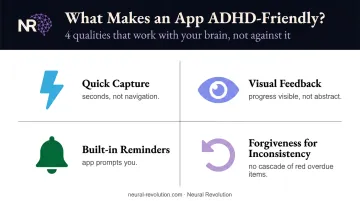
The apps below were evaluated against all four of these criteria — so you're not starting from scratch figuring out what actually works for an ADHD brain.
Best Productivity Apps for Adults with ADHD
These six apps address the most common ADHD executive function barriers. Find where your biggest friction lives and start there — not all six.
Todoist — Best for Task Capture and Working Memory Support
When a thought appears, it needs to leave your head immediately or it evaporates. Todoist is built for exactly that: fast capture through natural language input across every platform.
Type "call accountant Friday 2pm" and it schedules itself. No menus, no friction. ADDitude's review of Todoist highlighted this natural-language parsing — including shortcuts like "tomorrow" or "Thursday" — as its standout ADHD-relevant feature.
What makes it work for ADHD:
- Natural language scheduling removes capture barriers
- Color-coded labels reduce visual overwhelm
- Karma gamification provides small dopamine rewards for completion
- Recurring reminders externalize routines
Quick reference:
- Best for: Adults who lose tasks the moment they think of them
- Pricing: Free tier available; Pro ~$5/month billed annually (verify current pricing at todoist.com)
- Platforms: iOS, Android, Windows, Mac, Linux, web, Apple Watch, browser extensions
Tiimo — Best for Time Blindness and Visual Scheduling
A 2023 review of adult ADHD documented measurable impairments in time estimation, time reproduction, and time management. Tiimo makes time visible.
Instead of calendar blocks and text lists, Tiimo uses icon-based timelines and countdown timers. You can see the day at a glance without reading a single word. The countdown timer creates a tangible sense of time passing — the closest thing to an external clock for a brain that doesn't sense duration reliably.
Tiimo's official FAQ describes it as a visual daily planner designed specifically for neurodivergent brains, combining planning, to-do lists, focus tools, nudges, and AI task breakdown.
What makes it work for ADHD:
- Icon-based schedules are scannable, not text-heavy
- Countdown timers make the passage of time concrete
- AI task breakdown converts overwhelming tasks into timed micro-steps
- Gentle nudges prompt transitions without punishing missed ones
Quick reference:
- Best for: ADHD adults with severe time blindness or visual processing preferences
- Pricing: Free version available; Pro plan with monthly or annual billing; 7-day trial on yearly subscription (verify current pricing at tiimoapp.com)
- Platforms: iOS, iPad, Apple Watch, Android, Mac, web
Forest — Best for Focus Sessions and Phone Distraction
Forest uses a simple mechanic: a virtual tree grows while you focus. Leave the app, and the tree dies. That visual consequence, small as it sounds, creates just enough friction to interrupt the phone-checking reflex.
The ADHD brain responds to immediate, tangible consequences more reliably than abstract future rewards. Forest leans directly into that. Over time, completed sessions build into a visible forest — a satisfying record of sustained attention.
What makes it work for ADHD:
- Visual, immediate consequence for distraction (the tree dies)
- Growing forest provides cumulative dopamine reward
- App and website blocking reduces access to distractions
- Short session options lower the activation energy needed to begin
Quick reference:
- Best for: ADHD adults who lose work sessions to phone-checking
- Pricing: Free to start; Plus subscription pricing varies by region/platform (check the App Store or forestapp.cc)
- Platforms: iOS, Android, Apple Watch, Chrome extension, Firefox extension
Goblin Tools — Best for Task Initiation and Paralysis
Task initiation paralysis is one of the most debilitating ADHD barriers. You know what needs doing. You care about it. You still can't start. The sticking point is rarely motivation. "Respond to client email" is an outcome, not a task — and the ADHD brain needs the actual steps before it can move.
Goblin Tools does one thing well: it breaks vague tasks into concrete micro-steps. Type "respond to client email" and receive a checklist from "open email" to "click send." The "spiciness" slider controls granularity — turn it up if your brain needs even smaller steps.
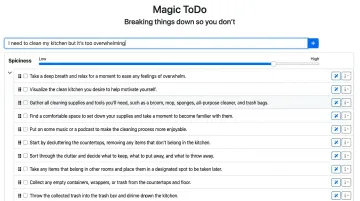
It's free on the web, with a $2.99 mobile app. No subscription, no commitment anxiety.
What makes it work for ADHD:
- Removes the executive function demand of figuring out where to start
- Adjustable granularity through the spiciness slider
- No subscription removes the psychological weight of "another app I'm paying for"
- Free web version requires no download to try
Quick reference:
- Best for: ADHD adults who freeze before starting tasks, even ones they care about
- Pricing: Free on web; $2.99 mobile app (iOS and Android)
- Platforms: Web (goblin.tools), iOS, Android
Habitica — Best for Routine Building and Habit Formation
Habit formation requires repetition, and repetition is inherently boring. For ADHD brains wired to seek novelty and immediate reward, "do the same thing every day" is a direct conflict with how the reward system operates.
Habitica reframes the problem: completing habits earns in-game rewards, levels up a character, and unlocks gear. The repetition that kills other habit trackers becomes the gameplay loop. Social accountability through party quests adds external motivation — other people are depending on you to complete your habits.
What makes it work for ADHD:
- Turns routine into a reward-driven game with immediate payoffs
- Social party quests add external accountability
- Visual progress indicators make consistency feel meaningful
- Free to start with no upfront commitment
Quick reference:
- Best for: ADHD adults who get bored with habit trackers quickly or respond to game mechanics
- Pricing: Free; subscription available for extras (verify current pricing at habitica.com)
- Platforms: iOS, Android, web
Motion — Best for AI Scheduling and Decision Fatigue
Every scheduling decision costs cognitive resources. For ADHD professionals managing complex workloads, the cumulative drain of deciding when to do what can consume more energy than the actual work.
Motion eliminates that entirely. It automatically places tasks on your calendar based on priority and deadlines, then reschedules in real time when plans change. A missed task doesn't turn into a cascading failure — it gets moved.
The tradeoff is real: the automated approach works best for users who can trust the AI to make reasonable decisions. If you need a strong sense of control over your calendar, the initial setup and automated adjustments may feel disorienting.
What makes it work for ADHD:
- Removes scheduling decision fatigue entirely
- Real-time rescheduling prevents the "everything is broken" feeling after one missed task
- Acts as autopilot for calendar management
- Integrates tasks and calendar in one view
Quick reference:
- Best for: ADHD professionals with complex workloads paralyzed by scheduling decisions
- Pricing: Individual Pro AI plan ~$19/month billed annually, ~$34/month billed monthly; free trial available
- Platforms: iOS, Android, macOS, Windows, web
How to Choose the Right App for Your ADHD Brain
Start with your single biggest daily friction point. Not your second-biggest. Not everything at once.
Match the Tool to the Challenge
| If your main struggle is… | Start with… |
|---|---|
| Losing tasks before you can write them down | Todoist |
| Losing track of time or being shocked by how fast it passes | Tiimo |
| Knowing what needs doing but being unable to start | Goblin Tools |
| Phone distraction breaking your focus sessions | Forest |
| Routines that collapse within days | Habitica |
| Calendar chaos and scheduling decisions draining you | Motion |
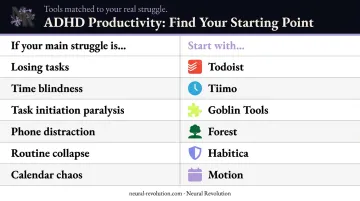
The One-App Rule
Downloading five new tools simultaneously creates the same executive function demand that made the problem worse in the first place. The cognitive load of managing multiple new systems compounds the very problem you're trying to solve — too many apps means too many re-entry points, too many places a task can disappear.
One app. Two weeks of honest use. Reassess from there.
The Sustainability Test
Once you've picked one tool, the real question isn't whether it works on a good day — it's whether it holds up on a bad one. Before committing, ask:
- Does it require daily manual review to function?
- Does it punish inconsistency with a wall of overdue items?
- Is the re-entry friction low when you've been away for a few days?
- Does it celebrate small wins, or just track failures?
Tools that reset gracefully and require minimal friction to re-enter are worth more than feature-rich tools that become another source of guilt.
Apps Are Tools, Not the Whole System
Apps can remind, structure, gamify, and break down tasks. What they can't do is teach you how your brain works, help you understand why certain strategies stick while others collapse, or build the self-awareness that makes any tool sustainable long-term.
This is where the app-abandonment cycle usually lives. It's not the app. It's the absence of a system underneath it.
At Neural Revolution, Dr. Eliza Barach and her team work specifically with high-achieving ADHD professionals and entrepreneurs who have already tried the apps, the habit trackers, the productivity systems. The coaching work builds the layer beneath the tools:
- Identifies which executive function challenges are actually driving the biggest barriers
- Designs environments and workflows that fit how each individual's brain operates
- Creates flexible structure that doesn't collapse under real-life ADHD variability
Dr. Eliza's DREAMS™ framework approaches goal-setting in a way that accounts for how ADHD brains process rewards, time, and priorities — a different foundation from SMART goals, which were designed for neurotypical brains and rarely translate for neurodivergent ones.
If you've cycled through apps and keep landing in the same place, the missing piece probably isn't a better app. It's the structure that determines whether any tool works at all. Neural Revolution's coaching is designed for ADHD professionals who are ready to build that structure.
Conclusion
Productivity apps are not cures, and the goal was never to find the perfect app. The goal is to find the right tool for your brain's specific friction point, right now.
Start with one. Use it for two weeks. Let it do one job.
Your ADHD brain isn't broken — it works differently, and that difference is worth designing around rather than fighting. When the right tools sit inside a coherent system built around how your brain works, the effort compounds — and what used to feel like constant friction starts to feel like traction instead.
If you're ready to build that system, Neural Revolution offers 1:1 ADHD coaching with doctoral-level psychologists who specialize in helping high-achieving adults build systems that fit how their brains actually work — not systems borrowed from neurotypical productivity culture.
Frequently Asked Questions
What is the best productivity app for ADHD adults?
The most effective choice depends on your specific executive function challenge. Todoist works well for task capture and working memory; Tiimo targets time blindness; Goblin Tools tackles task initiation paralysis; Forest addresses phone distraction. Start with whichever matches your biggest friction point.
Why do I keep abandoning productivity apps after a week?
App abandonment is extremely common with ADHD and is almost always a design mismatch, not a personal failure. Apps that demand consistent manual input, punish missed days, or require the executive functions ADHD disrupts will predictably fail. The fix is choosing lower-friction tools and introducing only one at a time.
What is the 1-3-5 rule for ADHD adults?
The 1-3-5 rule is a daily prioritization method: plan 1 big task, 3 medium tasks, and 5 small tasks for the day. It reduces decision paralysis by giving the ADHD brain a pre-set structure rather than an open-ended to-do list to navigate from scratch each morning.
What is the 10-3 rule for ADHD adults?
The 10-3 rule is a work-break strategy: work for 10 minutes, then take a 3-minute break. It functions like a shorter Pomodoro and lowers the activation barrier for starting by making the initial commitment feel small and manageable rather than open-ended.
What is the 24-hour rule for ADHD adults?
The 24-hour rule involves waiting 24 hours before acting on a non-urgent impulse: a purchase, a major commitment. Research on delay discounting in ADHD supports the rationale: building a pause between impulse and action gives the prefrontal cortex more time to engage.
Can productivity apps replace ADHD medication or coaching?
No. Apps are practical supports, not treatments. They can externalize specific executive functions and reduce daily friction, but they don't address the neurology underlying ADHD. Medication, therapy, and coaching work at a fundamentally different level — and work best when paired with well-chosen tools.