The problem usually isn't willpower. It's that most productivity apps were built for neurotypical brains: they assume you'll remember to open them, tolerate multi-step setup, and keep going after one missed day. That's not how ADHD works.
This guide takes a different approach. Instead of ranking apps by popularity, it organizes them by the executive function challenge they actually address — task initiation, time blindness, focus, or accountability. According to the CDC's 2024 MMWR data, an estimated 15.5 million U.S. adults currently have an ADHD diagnosis, with about half diagnosed in adulthood. Most of them have already tried the generic productivity stack. This list is for people who need something that fits how their brain actually works.
Key Takeaways
- ADHD apps work best as external scaffolding for one specific problem, not a complete productivity overhaul
- The most effective tools offer low-friction entry, persistent reminders, and shame-free restarts
- Apps complement professional support (coaching, therapy, medication)Apps complement professional support (coaching, therapy, medication) — they don't replace it
- Pick one app, test it for two weeks against one specific friction point, then evaluate
- No app resolves the cognitive patterns behind avoidance — that work requires human-level support
What Makes an ADHD App Actually Work for Adults
Generic productivity apps fail adults with ADHD for a predictable reason: they're built on assumptions that don't hold. They assume you'll remember to check the system. They require setup. They punish inconsistency with dead streaks and guilt-inducing gaps.
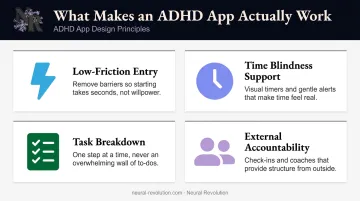
Four design principles separate apps that actually work for ADHD brains from ones that collect dust after week two.
Low-Friction Entry Is Non-Negotiable
If adding a task takes more than two taps, the ADHD brain will skip it. Not because of laziness — because of cognitive load. Multi-step input has a real cost when working memory is already stretched.
The features that keep friction low:
- One-tap task capture from anywhere in the app
- Voice input that doesn't require navigating menus
- Lock-screen widgets for immediate access
- No mandatory "system setup" before first use
If the tool asks you to build a workflow before you can add a single task, it's already too friction-heavy for most ADHD users.
Time Blindness Needs More Than One Notification
CHADD attributes the term "time blindness" to Russell Barkley and describes adults with ADHD as often living in the "now," where future time doesn't feel real or urgent. A 2023 review of adult ADHD time perception found significant timing deficits, with unmedicated adults showing effect sizes of d = 0.83 on time-estimation error. That's not a minor quirk — it's a meaningful neurological difference.
Single notifications get swiped away. Effective apps use persistent, escalating, or visual reminders that keep time present in the user's awareness throughout the day.
Task Breakdown and Visible Next Actions
Large, vague tasks don't just feel overwhelming — they trigger active avoidance in the ADHD brain. When the starting point isn't obvious, the brain's effort-reward calculation comes back negative, and the task doesn't get started. ADDA describes this as "task paralysis": feeling mentally stuck rather than motivationally absent.
The best apps either let you create granular subtasks or do the breakdown automatically, so the first concrete action is always visible.
External Accountability Changes the Equation
ADHD brains often need external urgency or social pressure to initiate. CHADD describes body doubling — working alongside another person — as a practical technique adults use to start and finish projects. Apps that incorporate body doubling, visible progress tracking, or gamification tap into the dopamine-motivation pathway more directly than a plain checklist ever will.
Best ADHD Apps for Adults: Our Top Picks for 2026
These apps were selected based on ADHD-specific feature alignment, low-friction design, clinical credibility where applicable, and sustained community trust among adult ADHD users. Verify current pricing before purchase, as subscription costs can change.
Inflow — Best Overall ADHD App
Inflow is a CBT-based mobile app built specifically for adult ADHD. It goes beyond task management to address the emotional and cognitive patterns underneath ADHD symptoms — shame cycles, avoidance, motivation crashes — through structured learning modules, daily challenges, journaling, and a peer community.
What distinguishes it from generic wellness apps is its clinical grounding. A 7-week open feasibility study with 240 adults found favorable usability and significant decreases in ADHD symptoms and functional impairment among completers. This was an open study, not a blinded RCT — but that still puts it ahead of most apps in this space, which offer no clinical validation at all.
| Detail | Info |
|---|---|
| Best For | Adults who want ADHD education and daily coping tools in one evidence-based platform |
| Pricing | $47.99/month or $199/year; 7-day free trial available |
| Platforms | iOS & Android |
EndeavorOTC — Best FDA-Cleared Digital Treatment
EndeavorOTC is the first FDA-cleared digital treatment for adult ADHD, developed by Akili Interactive Labs. It's a video game — one that targets the neural circuits involved in attention and cognitive control, designed by neuroscientists and cleared by the FDA on June 14, 2024 (510(k) clearance K233496) for adults 18+ with primarily inattentive or combined-type ADHD.
Its clinical credibility sets it apart from everything else in this list. The STARS-ADHD-Adult pivotal trial (221 adults, 14 U.S. sites) showed statistically significant ADHD attention composite score improvement (p < 0.0001), with 72.5% reporting quality-of-life improvements after six weeks. It is FSA/HSA eligible and there is no free trial — Akili's reasoning is that seven days is too short to assess a six-week treatment.
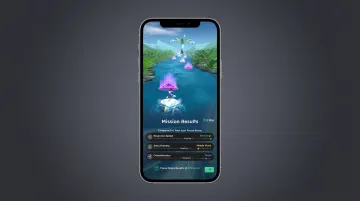
Important: FDA labeling states EndeavorOTC is not intended to replace any existing treatment and should be used as part of a therapeutic program.
| Detail | Info |
|---|---|
| Best For | Adults seeking a clinically validated, non-medication ADHD intervention |
| Pricing | $24.99/month; $69.99 (3 months); $99.99 (6 months); $129.99 (12 months); money-back guarantee after 6 weeks of consistent use |
| Platforms | iOS & Android |
Focusmate — Best for Body Doubling and Accountability
Focusmate pairs you with another person for a scheduled, camera-on work session. It operationalizes body doubling — a strategy where the presence of another person reduces avoidance and improves task follow-through — on demand, without needing to be in the same room.
Many adults with ADHD can work fine in a coffee shop but freeze the moment they're alone at home. Focusmate provides that external accountability structure remotely, without requiring a friend to be available.
Neural Revolution's FOCUS Forward group coaching program includes a complimentary Focused Space co-working community for this reason — body doubling works as a practical support tool between coaching sessions, not just as an occasional workaround.
Note: Focusmate does not currently have a native app. Users access it via web browser, with an option to add it to the Android or iOS home screen.
| Detail | Info |
|---|---|
| Best For | Adults who struggle with task initiation and need social accountability to get started |
| Pricing | Free (3 sessions/week); Focusmate Plus: $8/month (billed annually) or $12/month |
| Platforms | Web browser (desktop-first); mobile home screen shortcut available |
RescueTime — Best for Time Awareness
RescueTime runs silently in the background and automatically tracks time spent across apps and websites, generating reports that show exactly where hours went. For adults with ADHD experiencing time blindness, that data can be both clarifying and confronting.
The ADHD-specific value is the removal of manual tracking friction. You don't have to remember to log anything — RescueTime captures it automatically and surfaces the patterns your brain missed in the moment. Neural Revolution's coaching for ADHD time blindness works from the same principle: external systems that capture what the brain can't track in the moment give clients something concrete to plan from, rather than optimistic guesses.
| Detail | Info |
|---|---|
| Best For | Adults who lose hours to distraction and need objective data before they can build better systems |
| Pricing | Free Lite plan available; Team/premium tiers from $10/month (billed annually) — verify current individual plan pricing |
| Platforms | iOS, Android, Desktop (cross-platform) |
Goblin Tools (Magic ToDo) — Best for Task Initiation
Magic ToDo takes a single large, vague task and uses AI to break it into concrete, actionable steps. You paste in a task, set the "spiciness" (granularity level), and get an instant breakdown — no setup, no system design, no friction.
Built specifically with neurodivergent users in mind, the site describes it plainly: "mostly designed to help neurodivergent people with tasks they find overwhelming or difficult." Task initiation failure often isn't about motivation — it's about not knowing where to start. Magic ToDo removes that cognitive demand entirely.
The web version is free. Native iOS and Android apps are available at $2.99 as a one-time purchase to support running costs.
| Detail | Info |
|---|---|
| Best For | Adults who freeze in front of big tasks and need an instant starting point |
| Pricing | Free (web); $2.99 (iOS & Android apps) |
| Platforms | Web browser, iOS, Android |
Remember the Milk — Best for Task Management Without Overwhelm
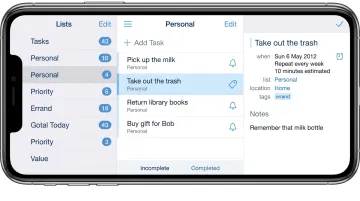
Remember the Milk is a clean, minimalist task manager that syncs across every major platform. It supports subtasks, recurring reminders, Apple Watch integration, and multi-channel notifications — without demanding you build a complex system first.
ADDitude reviewed it specifically for ADD adults, highlighting how the interface reduces the visual overwhelm that cluttered productivity tools can trigger. It has stayed relevant for years because it does the core job without requiring constant re-engagement or elaborate setup. If your biggest problem is forgetting things and losing track — not a missing complex system — this is worth a look.
| Detail | Info |
|---|---|
| Best For | Adults who need a reliable, low-maintenance task list they can actually maintain |
| Pricing | Free (Basic); $49.99/year (Pro, includes subtasks and advanced features) |
| Platforms | iOS, Android, Web, Apple Watch, Mac, Windows, Linux |
How to Use ADHD Apps Without Building Another System You'll Abandon
The most common mistake is downloading three apps and trying to build a complete productivity overhaul in a weekend. That approach fails not because the apps are bad, but because building a new system requires sustained executive function — which is exactly what ADHD impairs.
Start With One Problem, One Tool
Identify the single most disruptive friction point right now. Task initiation, time blindness, forgetting appointments? Pick one. Test one app against that specific problem for two weeks before adding anything else.
The Restart Problem Is Real — Plan for It
Adults with ADHD often abandon a tool after one bad week, then feel shame about it, which makes returning even harder. Choose apps that have flexible resets, no punishing streak mechanics, and low-consequence skipped days. Coming back after a break is still a win — it is not starting over.
That low-consequence philosophy is the whole point. The structure below is intentionally minimal — because minimal is what actually lasts:
- Three recurring reminders at consistent times
- One daily checklist with three items maximum
- A weekly reset moment (Sunday evening, five minutes)
If that feels underwhelming, that's the point. The goal isn't an impressive system — it's one you'll still be using in three months.
When Apps Aren't Enough: The Case for Human-Level Support
Apps can prompt, track, and break tasks into smaller pieces. What they can't do is help you understand why you keep avoiding the same task week after week, untangle the shame cycle underneath chronic disorganization, or redesign a work environment that's structurally incompatible with how your brain works.
Bridging that gap requires someone who understands ADHD from both a scientific and a lived perspective.
Neural Revolution's coaching is built for high-achieving adults who have already tried the apps, the planners, and the productivity systems — and still need a thinking partner who can help them build structure that fits their actual brain.
Dr. Eliza Barach, a cognitive psychologist and Board Certified Coach diagnosed with ADHD at seventeen, founded the practice at the intersection of academic research, clinical understanding, and lived experience. Her DREAMS™ framework for ADHD-friendly goal-setting addresses what standard productivity systems miss: the emotional, motivational, and neurological realities that SMART goals ignore.

If you've exhausted the app stack and want to explore what evidence-based ADHD coaching actually looks like, Neural Revolution offers a 30-minute Discovery Consult for $50, which applies toward your first session if you move forward.
Frequently Asked Questions
What are the best apps for ADHD management?
Inflow (CBT-based learning and daily tools), Focusmate (body doubling), and RescueTime (time awareness) consistently stand out. The best choice depends on which specific challenge is most disruptive — task initiation, time blindness, or focus — so start there rather than with a popularity ranking.
Are there free ADHD apps that actually work?
Yes. Goblin Tools is free on the web and highly effective for task breakdown. Focusmate offers three free sessions per week. Forest and Flora are free or low-cost focus apps with proven community use among adults with ADHD.
Can ADHD apps replace medication or therapy?
No — apps are external scaffolding tools, not treatments. Standard ADHD care includes medication and interventions like CBT, and apps work best as complements to that support. EndeavorOTC itself states it is not intended to replace any existing treatment.
Why do I download ADHD apps but never use them?
Setup friction, the wrong tool for the wrong problem, or trying to build too many systems at once — these are the usual culprits. It's a common ADHD pattern, not a character flaw. Start with one app targeting one specific friction point and keep the barrier to entry as low as possible.
What features matter most in an ADHD app for adults?
Low-friction entry (one or two taps maximum), persistent or escalating reminders, task breakdown capability, and some form of external accountability or social pressure. These features map most directly to how the ADHD executive function system actually works.
How long should I try an ADHD app before deciding if it works?
At minimum, two consistent weeks targeting one specific problem. EndeavorOTC recommends six weeks at 10-25 minutes per day, five days a week, before drawing conclusions. One skipped week is not a reason to abandon the tool.